Blog · July 19, 2026 · Olivier, developer of Notify
How to get email notifications for Chrome Web Store reviews
Short answer: yes, natively, with a setting that is off by default and easy to miss. The Chrome Web Store can email you when a user posts a review on your extension or updates an existing one. Here is where the setting lives, what else the dashboard gives you, and where the built-in tools stop.
Turn on "Item review completed"
Google documents the setting in its Manage user feedback guide. It takes about thirty seconds:
- Open the Chrome Web Store Developer Dashboard.
- Go to your Account settings.
- In the Notifications section, enable Item review completed. You can turn on an email notification, a web notification, or both.
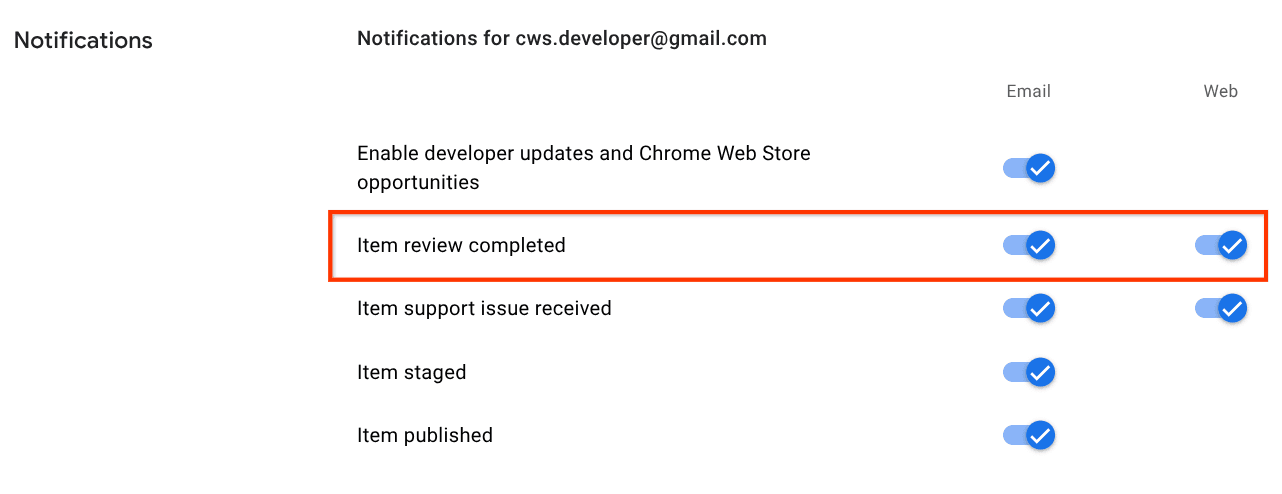
That's it. From then on, Google notifies you when someone posts or updates a review on your items, and you can reply from the listing while the feedback is still fresh.
Two more built-in tools worth knowing
While you are in the dashboard, two related features are easy to overlook. The Rating tab gives you an overview of your extension's ratings, including the total number of reviews and how ratings evolve over time. And you can link people straight to your review section by appending /reviews to your item's store URL, which is handy when you ask happy users for a rating.
Also good to know: replying to a review does not notify the reviewer, and you cannot remove a review from your listing. A prompt, public reply is still worth it, because everyone else who reads the review will see it.
Where the native notification stops
The setting covers the items in your own developer account, on the Chrome Web Store. Two situations fall outside of it:
- Listings you don't own. If you want to follow the reviews of a competitor's extension, or of an item published from another account, there is nothing to enable.
- The Google Workspace Marketplace. Reviews of Docs, Sheets, Slides, Forms, Gmail, Chat, Drive, Meet and Classroom add-ons live on the Marketplace, and the Marketplace has no review notifications at all: no email, no API, no dashboard alert.
That second gap is why Notify exists. It watches any public listing you point it at, on the Marketplace or on the Chrome Web Store, and emails you every new review with the author, rating and complete text, in every language your users write in. Edited reviews are updated in place instead of pinging you twice, and each listing gets a rating chart over time. Plans start at $3 per month per listing, with 14 days free.
14 days free · from $3/month per listing · cancel anytime